Dev Life
I came across this on the forums. I guess this was a video played at the May 21 Developer’s Conference. Pretty funny.
Watch below or go to the YouTube page.
Permalink
Comments off 
I came across this on the forums. I guess this was a video played at the May 21 Developer’s Conference. Pretty funny.
Watch below or go to the YouTube page.
Permalink
Comments off
Salesforce posted their Summer ’07 landing page. Get all the info on the Summer release there including Release Notes, Admin Preview Notes and landing pages for each of the new functionality pieces.
It looks like a rather large release. It’s pretty impressive, I must say. Some of the nice features that jump out for me and past clients are:
If you want an early look at Summer ’07, you can sign up for a pre-release account and see it all in action in your own sample org.
And the logo winner is…

Thanks to Salesforcewatch and CRM FYI for actually letting me know about the landing page even before Salesforce blogged about it.
Since creating the Akismet Spam Check for Web to Lead forms, I have been using it on my websites. So far the script has worked very well and Akismet has done a very good job of catching spam.
Since May 29th (when I setup my web forms to do the check), the following has taken place:
A Salesforce.com Lead Assignment Rule put all 13 of those leads into a “Spam” queue and got them out of the way. All of my workflow & auto response rules use the spam flag populated by Akismet to determine the notification to send me and whether or not to send a notification to the lead submitter. The end result is that I know about all the spam and I NEVER send an auto response to spam submitters. Yahoo!
Has anyone else implemented the scripts? What’s your experience been?
Permalink
Comments off

I am pleased to announce Arrowpointe’s newest product, Arrowpointe Maps.
Arrowpointe Maps is an on-demand mapping platform that facilitates a conversation between Salesforce.com & MapQuest allowing for easy deployment of mapping capabilities in your organization and providing end-users a simple means for mapping their data. Arrowpointe Maps is configurable and can be tailored to your organization, so that your users can work with their information in a meaningful way.
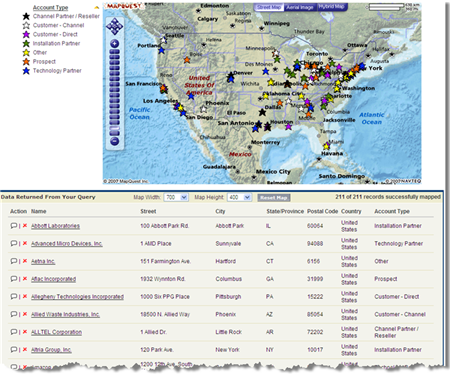
Arrowpointe Maps currently supports mapping your Leads, Accounts, Contacts, Opportunities and Cases (with Custom Objects coming soon). There are currently 2 ways of mapping your information:
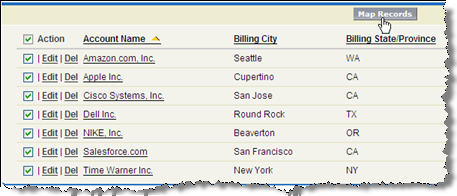
 button comes with the Arrowpointe Maps AppExchange package for you to include on your List Views for all supported objects. On a View, check the records you want to map and click the Map Records button.
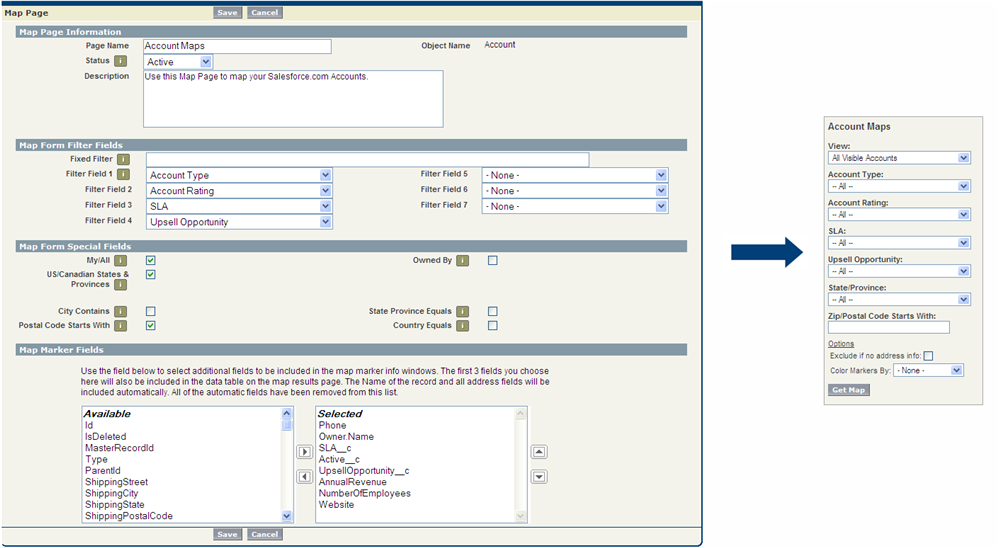
Some other functionality of note:
The functionality of the product will not end there. We have other enhancements in the pipeline, but more importantly, we want to implement the functionality YOU (the customer) needs. This product will be evolving.
Mapping your Salesforce.com data (any data for that matter) has proven to be a much desired, yet very difficult thing to do. There are some key requirements that I hear over and over again from Salesforce customers contacting me about mapping solutions:
Arrowpointe Maps was designed to deliver upon those principles.
The official location for information on Arrowpointe Maps is its product page at http://www.arrowpointe.com/maps. There, you will find answers to the most frequently asked questions.
Arrowpointe Maps is currently live, but is not yet publicly available on the AppExchange. It is being made available by invitation only at this time. If you want to be invited to trial the product, please submit your contact information to Arrowpointe on the Arrowpointe Maps product page. If you have contacted Arrowpointe before regarding our Salesforce.com & Google Maps mashup, then you are already on the list and don’t need to submit your contact information.
I will continue to post more information about Arrowpointe Maps on this blog. If you are interested in subscribing to the contents of the blog, you can get more information here.
Lastly, Arrowpointe has many other products that work with Salesforce.com. Many of them are available on the AppExchange. To see the entire portfolio, please visit our main Product page.
Permalink
Comments off
As you may know by now, Salesforce has an Idea Exchange category for upcoming Summer ’07 features. There are a lot of great features to be excited about including improvements to Mass Email, Workflow and Reporting. However, for me, the most exciting/useful feature will be the Cross-Object Formulas. Salesforce product management added a note to that idea saying that:
This idea really encompasses two features – referencing parent fields on a child, and rolling up child information to a parent. The latter of these is on schedule to be available with the Summer ’07 release! Stay tuned for more information in the coming months!
The ability to create formulas that COUNT, SUM, MIN, MAX, etc. values from child records will be huge. It will especially huge if conditions can be added within that. For example, from an Account, you might have a formula field to SUM(all Won Opporortunities from a particular Lead Source). Another might be to simply SUM(all Won Opportunities).
Until the release notes are out, we won’t know exactly what this functionality will (not) do, but it’s exciting to know some aspect of it is coming. This will save users a lot of time from having to run reports to get this information and it will save developers a lot of time having to create those reports!