Auto vCard Bug Fix

A minor nuisance to the Auto vCard functionality was fixed tonight. Outlook automatically prepends the website field with http://. If you had this value in your website string in Salesforce, the resulting vCard would have http://http\://.

This was fixed so that the website will be cleanly added to Outlook now. If you are using another PIM, let me know if this causes you problems. You can submit a support ticket here.

No changes are required if you use the Auto vCard functionality. This was all taken care of at the server level.

Get Auto vCard from the AppExchange

Comments off comments feed

OEM Edition

Salesforce.com announced the launch of the OEM Edition yesterday. The OEM Edition allows Salesforce partners to build applications on the Salesforce.com platform and offer their products to non-Salesforce.com users. The price per user for the OEM Edition is $25/month.

I think I am interpreting this correctly…

You, as an OEM provider, offer your product/service to both Salesforce.com customers and customers not yet on the Salesforce platform. The OEM Edition only applies to the customers not yet on the Salesforce platform. As an OEM vendor, you pay Salesforce.com $25/month/user for anyone that takes up a license. It is then up to you to pass through that cost to your customer. The end result is that the customer only has a relationship with you, the OEM vendor. You, in turn, have the relationship with Salesforce.com as the platform provider for your product/service. Correct? Please add your comments to help clear this up. It is not totally straight forward in the press release.

This is a step in the right direction, but is not as ideal (IMHO) as the Platform Edition licensing I recommended in April. I feel that another licensing model is still necessary that allows you, as a consumer or corporate purchaser, to buy licenses to the Salesforce.com platform only. And to buy them directly from Salesforce.com. This would be a relationship between you and Salesforce.com with no third party involved. You just pay your subscription fee to the platform. From there, you would have the ability to add to it through AppExchange or by building your own apps. This allows for much more flexibility in that you start with the platform and then select/build the apps you want. Like I said, the OEM model is a step in the right direction, but you need to want one of those OEM products before you can get on the platform. The Platform Edition idea is an option to opt-in to the platform first (like buying a computer with only the operating system and then choosing the software you want).

Comments (8) comments feed

Use the Skype Web Toolbar for one-click dialing from Salesforce.com

Users of Skype can download the Skype Web Toolbar. The Skype Web Toolbar recognizes phone numbers and Skype Names on webpages, so that you can call with one click, through Skype. It works well when using Salesforce.com. No Salesforce.com configuration required. All phone number fields are transformed into clickable links that launch Skype to dial that number.

Skype Web Toolbar

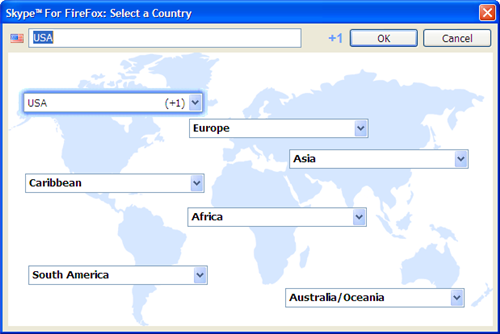
This will work well for non-US users too. The toolbar allows you to select your default country so that a country code is not used when dialing.

Skype Web Toolbar Country Selector

The Skype Web Toolbar is available for both IE & Firefox.

Comments (2) comments feed

AppExchange Conference, May 24th

Salesforce is hosting the AppExchange User, Partner & Development Conference on May 24th in San Francisco. There are separate breakout sessions in the afternoon for Customers, Partners and Developers. Each group has its own “track”. The breakout sessions look quite good.

I was very excited when I saw this event was taking place and was excited to be a part of it. Unfortunately, I am unable to attend. I am very interested in hearing about how it goes. If you are blogging the event, add a comment here and point to your blog so I (we) can keep an eye on what comes out of it. Or comment here directly with your updates on the event.

The morning calls for a keynote from Marc Benioff and an “Exclusive Preview of New Applications”. I am interested in seeing what announcements come out of it!

Comments off comments feed

Open custom links in the same window without creating nested frames

If you use custom links regularly, you know about this issue. It’s an issue when you decide to open custom links in the existing window rather than a popup window. You can get nested frames where the entire Salesforce.com application is within the frame where the data should reside like in the screen shot below. For this screen shot, I had a custom link from the Account Page Layout to a specific report. I chose to Open in Salesforce window without sidebar.
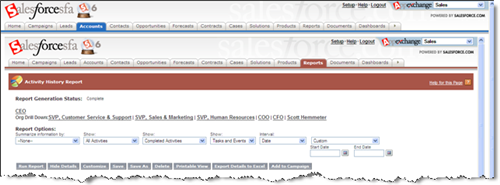
nested_frames.png

If I run the custom link 3 times in a row, my screen now looks like this.
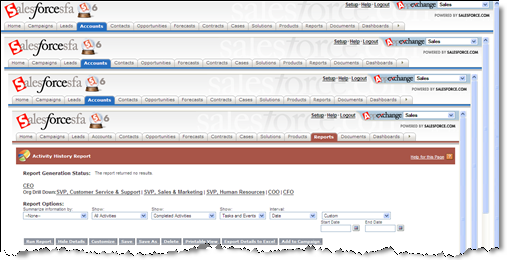
nested_frames2.png

You get the idea.

Because of this issue, many people opt for using pop-up windows instead. This can be somewhat annoying to an end user, though. We have pop-up blockers now because people don’t like this. Why open another window? You can fix this problem, by using a simple S-Control for your custom link rather than using a direct URL. All you need to do is copy the code below. Where it says {URL GOES HERE}, replace that with the same URL you put in your Custom Link.

< script language="JavaScript">

function redirect()
{
parent.frames.location.replace(“{URL GOES HERE}”);
}

redirect();

< /script >

Note: In order for the code to appear on this blog post I had to add a space in the < script> and < /script> tags. You’ll need to remove those spaces too.

Combine this trick with my old post about Auto-creating reports from web links to do some dynamic reporting right from record (e.g. run an Activity History report for a specific account right from the Account page).

Comments (7) comments feed

Next entries » · « Previous entries