Upgrade to AppExchange Package

The Arrowpointe Maps AppExchange package was upgraded to include 2 new tabs to let you directly visit the Routing & Map Reports functionality. It was also upgraded to utilize a more modern version of the API.

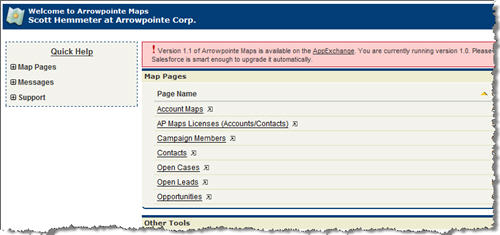
If you are an admin using Arrowpointe Maps, you’ll see a warning at the top of the screen like below:

arrowpointemaps_upgradewarning.jpg

To upgrade, simply:

  1. Go to AppExchange and click Get It Now. You DO NOT need to uninstall the old version.
  2. Follow the prompts on the screen to sign in and install the application as you install any other application. The screen will indicate it’s an upgrade.
  3. Once completed, you should add the new Map Reports and Routing tabs to the Arrowpointe Maps custom application so that your users can access that functionality directly. If you don’t do this final step, they can still access this functionality from the front page of Arrowpointe Maps.

Submit a Case from the application’s front page if you have any problems.

Comments off comments feed

Create Maps from Salesforce Reports

In the latest version of Arrowpointe Maps, there is functionality that lets you create maps by pulling data directly from your Salesforce.com Reports.

This capability essentially lets you map anything in Salesforce.com that has an address or is related to something with an address. Bottom line is that if you can get an address into your report, you can put that data onto a map.

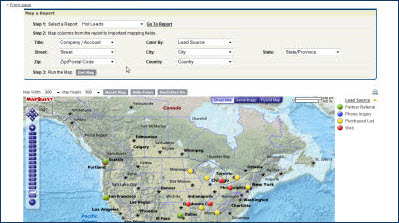
I created a video explaining this functionality. Click the image below to watch it.

arrowpointemaps_mapreports.jpg

About Arrowpointe Maps

Arrowpointe Maps is an on-demand mapping platform that facilitates a conversation between Salesforce.com & MapQuest allowing for easy deployment of mapping capabilities in your organization and providing end-users a simple means for mapping their data. Arrowpointe Maps is configurable and can be tailored to your organization, so that your users can work with their information in a meaningful way.

The official location for information on Arrowpointe Maps is its product page at http://www.arrowpointe.com/maps. There, you will find answers to the most frequently asked questions, screencasts and links to its AppExchange page.
Comments (7) comments feed

Arrowpointe Maps v1.0.9

Version 1.0.9 of Arrowpointe Maps was just released. You can read about all the improvements on the Change History page.

The major changes are:

  • You can now create maps by pulling data directly from your Salesforce.com Reports. I’ll post a video of this functionality soon. This fully addresses the popular idea expressed here + a bit more. This functionality is being marked as “beta” due to Salesforce not having a true API to access report data.
  • You can now email your driving directions from the application. You can email up to 10 addresses at once, including an option to BCC yourself.
  • Added a Created By filter option on Map Pages. It works just like the Owned By filter option that’s existed for a while, but it bases the filter on the creator of a record. Edit your Map Pages and check the Created By checkbox to add this option to your Map Pages.
  • Added a Query Size Limit at the Subscription level. It defaults to 2000 records. This means that Arrowpointe Maps will return up to 2000 records for every query. If a query for more records is made, the application will return the first 2000 records and the end-user will be provided with a message explaining what happened. An increase to the query limit can be requested by submitting a Case to us. This change was made to eliminate the issues of run away queries that freeze a browser.
  • The improved map marker dot and star images were re-implemented, so the maps look more professional.

All the functionality described above is available now. A new AppExchange install will be available later this week, which will be recommended for everyone. The new download includes 2 new tabs to let you go directly to Routing & Map Reports, without needing to visit the Arrowpointe Maps front page first, and also upgrades the Salesforce API version used by the application. Once that package has been released, I’ll let you know by: making a new blog post, sending all subscribers an email and adding a message to the application for Admins to see if they are using an older install version.

About Arrowpointe Maps

Arrowpointe Maps is an on-demand mapping platform that facilitates a conversation between Salesforce.com & MapQuest allowing for easy deployment of mapping capabilities in your organization and providing end-users a simple means for mapping their data. Arrowpointe Maps is configurable and can be tailored to your organization, so that your users can work with their information in a meaningful way.

The official location for information on Arrowpointe Maps is its product page at http://www.arrowpointe.com/maps. There, you will find answers to the most frequently asked questions, screencasts and links to its AppExchange page.
Comments off comments feed

MapQuest Developer Site & Blog

If anyone has an interest in developing on the MapQuest mapping platform, I wanted to point you to a few resources. Their API works in many contexts (server-side API, JavaScript API, ActionScript API). Their API may not have the street cred that Google has, but it’s a really solid platform to work with and on par with the competition and superior in some cases.

If you develop on the MapQuest platform, please drop me a line in the comments and share your thoughts.

Comments off comments feed

Salesforce on the iPhone

Salesforce demonstrates a sample Salesforce application built on the Apple iPhone SDK.

Comments (2) comments feed

Next entries » · « Previous entries