Create Maps from Salesforce Reports
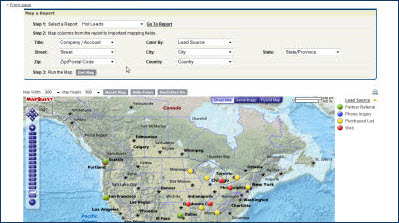
In the latest version of Arrowpointe Maps, there is functionality that lets you create maps by pulling data directly from your Salesforce.com Reports.
This capability essentially lets you map anything in Salesforce.com that has an address or is related to something with an address. Bottom line is that if you can get an address into your report, you can put that data onto a map.
I created a video explaining this functionality. Click the image below to watch it.
About Arrowpointe Maps
Arrowpointe Maps is an on-demand mapping platform that facilitates a conversation between Salesforce.com & MapQuest allowing for easy deployment of mapping capabilities in your organization and providing end-users a simple means for mapping their data. Arrowpointe Maps is configurable and can be tailored to your organization, so that your users can work with their information in a meaningful way.
The official location for information on Arrowpointe Maps is its product page at http://www.arrowpointe.com/maps. There, you will find answers to the most frequently asked questions, screencasts and links to its AppExchange page.
Kathy DiMarco Said,
December 19, 2009 @ 11:40 am
Is there a limit to the number of records you can have in a report that you want mapped?
Jen Jonas Said,
January 4, 2010 @ 3:53 pm
Are you able to edit the size of the icons (dots and stars)?
Scott Hemmeter Said,
January 4, 2010 @ 3:57 pm
@Jen, at this time you cannot modify the size of icons.
MIchael B Said,
April 22, 2010 @ 9:33 am
What are the costs and can this be integrated with salesforce professional?
Scott Hemmeter Said,
April 22, 2010 @ 9:55 am
Yes, the application fully supports Professional Edition.
Carlos Dominguez Said,
April 24, 2012 @ 7:18 am
any experience with the Maps for Latin America countries ?
Scott Hemmeter Said,
April 24, 2012 @ 7:48 am
Carlos, we have experience with mapping worldwide. I suggest you check out our latest app, Geopointe.