PHP Toolkit Tutorial

Mike Simonds created a blog with a Salesforce category feed-icon-12x12.png to it. He just got it started and has written part 1 in a series of PHP Toolkit Tutorials.

This first example focuses on querying an Oracle database and pushing data to Salesforce.com using the upsert method.

If you are interested in the PHP toolkit (which is my preferred toolkit), it’s worth a read.

Check it out.

Comments off comments feed

Use a List button to POST data to an external page

This is actually more of a lesson in JavaScript, but it shows how flexible the Salesforce environment can be to meet various requirements. The ability to add “OnClick JavaScript” behind a button is a really nice feature.

My requirements were:

  1. Ability for an end user to, from an Account view, check the records that need to be processed and click a button to process them.
  2. The processing is to take place in an external PHP page
  3. Pass the parameters as an HTTP POST transaction (i.e. do NOT include the parameters in the URL string).

I knew I would need to create a custom List button so that it could appear above the view. I used the OnClick JavaScript option because what I needed to do was simple and I didn’t want the overhead of an s-Control getting invoked. That solves requirement #1.
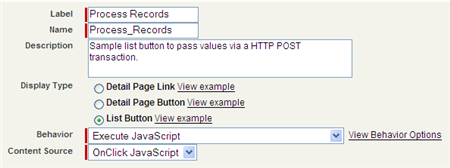
list_button_setup.png

Requirement #2 could be solved by having the button use 2 lines of JavaScript to pass the parameters to the PHP page.

idArray = {!GETRECORDIDS($ObjectType.Account)};

window.open(“https://www.mydomain.com/script.php?session={!API.Session_ID}
&server={!API.Partner_Server_URL_90}&idArray=”+idArray);

This got the job done, but violates requirement #3, which is to keep the data sent to the page hidden from view.

To meet requirement #3, I had to use JavaScript to dynamically build an HTML form on the fly, add data to it and then submit it.

// create the form. Set it up to POST the transaction
f = document.createElement(“form”);
f.action=”https://www.mydomain.com/script.php”;
f.method = “post”;
f.target = “_blank”;

// add the session id as a parameter
i = document.createElement(“input”);
i.id = “session”;
i.name = “session”;
i.type = “hidden”;
i.value = “{!API.Session_ID}”;
f.appendChild(i);

// add the server location as a parameter
i = document.createElement(“input”);
i.id = “server”;
i.name = “server”;
i.type = “hidden”;
i.value = “{!API.Partner_Server_URL_90}”;
f.appendChild(i);

// Get the Account IDs that were checked
idArray = {!GETRECORDIDS($ObjectType.Account)};

// add the idArray as a parameter
i = document.createElement(“input”);
i.id = “idArray”;
i.name = “idArray”;
i.type = “hidden”;
i.value = idArray;
f.appendChild(i);

// add the form to the document.
document.body.appendChild(f);

// submit the form
f.submit();

This solution worked perfectly. The end result was that the PHP page the form posted to was able to retrieve the Salesforce session Id, endpoint location and an array of Id values via the $_POST variable and none of those parameters were visible in the URL. The PHP was opened in a new window, which was defined in the f.target = “_blank”; line above.

I don’t know if there’s an easier way to do this or not (comments are welcome), but this turned out to be very easy and is an approach I will re-use. The hardest part was trying to figure out the JavaScript syntax.

This is a nice trick for non-Salesforce JavaScript development too.

Comments (2) comments feed

New Home for SFDC User Groups

There’s a new home for all of the formalized Salesforce.com User Groups that are out there. Visit http://usergroups.salesforce.com/ or click on the MEET Users Near You link on the Community page.

The user groups used to be located as Dreamforce blogs, but have since been moved to this new location. The old URLs are being routed to the new, so you shouldn’t be missing any posts in the blogs. However, it’s probably a good idea to update your RSS readers with the new location.

Comments off comments feed

Salesforce Platform Edition Has Arrived

A little over a year ago, I wrote a post suggesting Salesforce offer a “Platform Edition” that offers the Apex platform to companies/developers, but excludes CRM from it.

In a press release today, Salesforce announced that it will now be offered. The offering sounds very similar (except more expensive 🙂 ) to what I wrote about a year ago. Visit Salesforce’s landing page about this new offering for more information.

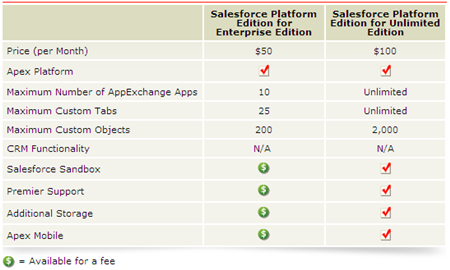
Per the website, the following is the high-level offering:

sfdc_platform_edition1.png
As of April 23, 2007. See the Salesforce website for up to date information.

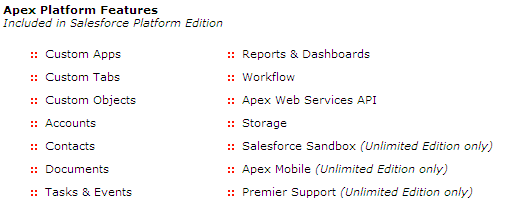
For this offering, the Apex platform consists of:

sfdc_platform_edition2.png
As of April 23, 2007. See the Salesforce website for up to date information.

It sounds almost identical to what I suggested except that it doesn’t sound like adding/removing licenses is as self-service as I’d like. You still have to run through a sales organization to get it.

What isn’t clear is whether a company can simply purchase the Platform Edition without purchasing CRM first. The marketing materials on the website make it sound like you have to be a CRM customer first and then you can extend non-CRM functionality to others. Also, the names of the offerings are “Salesforce Platform Edition for Enterprise Edition” and “Salesforce Platform Edition for Unlimited Edition“. This definitely makes it sound like its not a stand-alone offering, which is too bad. It would have been an easy thing to do and it would open up their market a lot more. I imagine many companies would be interested in starting with non-CRM offerings and move to CRM later once they see how great the platform is.

It’s definitely a step in the right direction.

Comments (5) comments feed

Schedule your Apex logic

Steve over at gokubi.com feed-icon-12x12.png has been doing a lot with Apex Code recently. He has a clever post about writing Apex code triggers and having them run on a schedule. It’s a good post to get the wheels turning with regards to what you can now do on the platform.

Nice work, Steve.

Comments off comments feed

Next entries » · « Previous entries