Using Aggregate Functions
In Spring ’10 Salesforce released new Apex functionality for aggregate functions. Prior to this feature being available, one would have to perform a large query, loop through it and perform calculations themselves to do things like count records, sum values, get the max value, etc. Now, you can do it in one simple, fast query!
The API Guide has all the details about how to perform aggregate functions in SOQL, but at a high-level, they (along with the GROUP BY clause) let you do things like:
- Get a count of Accounts grouped by Industry & State
- Get the avg Opportunity amount grouped by Calendar Month
- Get the sum of Custom Object $ field grouped by Account
- etc.
Get the idea? The functions you have available are COUNT(), COUNT_DISTINCT(), AVG(), SUM(), MIN(), MAX(). Think of these like you would the Columns To Total in a summary report.
You can also use the GROUP BY clause in your query to summarize your data by other fields. Think of it like a Summary Report grouping.
The best way to learn it is to put it into practice. To do so, I am going to “upgrade” the code from my Campaign Member Summary using Google Charts post. The goal is to create a chart that looks like below:
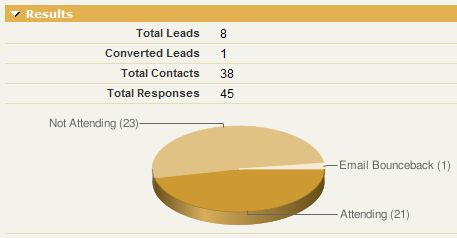
The original controller used the following code to build the count of records per Campaign Member Status:
// List of valid Campaign Member Statuses for the Campaign
List<CampaignMemberStatus> list_cms = [select Id, Label from CampaignMemberStatus where CampaignId = :camp.id];

// Loop through each Campaign Member Status, get a count of Campaign Members and add it to the items list
for (CampaignMemberStatus cms:list_cms) {
integer Count = [select count() from CampaignMember where CampaignId = :camp.id AND Status = :cms.Label];
if (Count > 0) {
items.add(new ChartDataItem(cms.Label, Count.format()));
}
}
The code above works just fine, but has some issues. The main issue is that we are performing a query inside a for() loop. Bad! If a Campaign had more than 20 statuses, the code would fail. Also, this is a performance hit because we have to perform as many queries as there are member statuses. Enter aggregate functions.
The improved controller changes the query to work like this.
// Get all the data in one query
AggregateResult[] groupedResults = [select Status, count(Id) from CampaignMember where CampaignId = :camp.id group by status];

// Loop through the query and add chart items
for (AggregateResult ar : groupedResults) {
     items.add(new ChartDataItem( String.valueOf(ar.get('Status')), String.valueOf(ar.get('expr0'))));
}
Now we are doing everything we need in 1 query. Even if we had 1000 different member statuses, it wouldn’t matter. We should never hit a governor limit with this code and performance has also been improved. Some important things to note in making this change and in understanding aggregate functions:
- Your controller class should be on API version 18.0 or higher. 18.0 is the Spring ’10 release and that’s when these functions were introduced.
- The results of a query with aggregate functions should result in a AggregateResult[] collection.
- The get() method is used to retrieve data from an AggregateResult object (used inside the loop when looking at a single result)
- To get the value from a field your are grouping by (i.e. doesn’t have a function for it), use .get(‘fieldName’). In the above example, I use this to get the Status value I am grouping by.
- To get the value from a field that has an aggregate function, use .get(‘expr#’), where # is the index number for that field. A query can have multiple functions in it so you need to specify which function you are grabbing and you do so by its index number. For you non-programmers out there, remember that counting starts at 0. In the above example, I use this to get the count(id) value. Since I only have 1 aggregate function in my query, i get it using .get(‘expr0’) where 0 is the index number for my function result.
- The get() method returns an Object type so you will need to use the appropriate valueOf() method to put it into the data type you need.
NOTE: As of writing this post, the IDE was not yet upgraded to 18.0 so I had to do this work inside the browser and I used the new-ish Deploy functionality from inside Salesforce to migrate the change from Sandbox to Production.
Simon Fell Said,
February 10, 2010 @ 11:02 am
You can assign aliases to the expr’s, so you don’t need the expr# stuff, e.g.
select status, count(id) as myCount from ….
and then do .get(‘myCount’) to get the value.
Simon Fell Said,
February 10, 2010 @ 11:03 am
oppp, skip the as, i always forget that part
select status, count(id) myCount from ….
Jason Said,
February 10, 2010 @ 11:19 am
One thing to watch out for is this line:
AggregateResult[] groupedResults = [select Status, count(Id) from CampaignMember where CampaignId = :camp.id group by status];
is still governed by the query row limit (ie 10000 for VF pages) and what makes this even trickier is that you cannot use the limit clause on a Aggregate query. And what makes this even more dangerous is that SOQL limit exceptions cannot be caught and handled.
Scott Hemmeter Said,
February 10, 2010 @ 11:22 am
@Jason, does a lot of that go away with Spring 10 when collections have no limit? Why would there be a 10,000 row limit on a query like this when all you are retrieving is a number?
Jason Said,
February 10, 2010 @ 11:26 am
Because to get the number (avg, count, sum) database must query all of the rows.
Min and Max are sort of silly as you could always get these by using order by asc / desc and limit 1.
Jason Said,
February 10, 2010 @ 11:55 am
Actually I am wrong. Something like this:
AggregateResult[] groupedResults = [SELECT Account.Industry, AVG(Amount)aver FROM Opportunity group by Account.Industry];
for(AggregateResult a : groupedResults){
system.debug(a.get(‘Industry’));
system.debug(a.get(‘aver’));
}
…according to the debug log limits is only returning 1 row even though it says 152 rows where returned. I’m guess the 152 is the number of Industries.
It would appear using group by is the key to controlling row limits.
Something like this will cause the too many query rows exception:
AggregateResult[] groupedResults = [SELECT AVG(Amount)aver FROM Opportunity];
Wes Said,
February 11, 2010 @ 3:05 am
Nice work Scott, these will be incredibly useful going forward.. and to some degree in making legacy code more efficient *grumble grumble*.
Mike Leach Said,
February 13, 2010 @ 4:22 pm
Nice post. I share the pain of only being able to develop for v18 features in the browser.
Evan Callahan Said,
February 16, 2010 @ 10:31 am
Great post. FYI, I am working on these features in the IDE – all you have to do is open the meta…xml file and change the version to 18.0, and then you are able to work on the features there.
Brett Kahnke Said,
February 24, 2010 @ 10:19 am
Working great for us. Thanks! Any idea why this code would cause IE to have the non-secure information pop-up every time the Campaign is viewed?
Brett Kahnke Said,
February 24, 2010 @ 10:52 am
Sorry, silly question. I know why – it’s caused because the google charts don’t support https: But, how do you deploy this to your users without driving them nuts? Thanks again
Jason Venable Said,
March 31, 2010 @ 11:01 am
Okay. I think my original statement was correct. These queries are limited to 10,000 rows. I don’t know why but I swear this type of query was working earlier but now it is failing to many query rows.
AggregateResult[] groupedResults = [SELECT Account.Industry, AVG(Amount)aver FROM Opportunity group by Account.Industry];
As I originally stated this is because the database must query every row to calculate the average.
Jason Venable Said,
March 31, 2010 @ 11:10 am
@Brett Kahnke
This message only appears with IE browsers.Google “disable ie mixed content warning” and it should show you how to disable this warning.
Bill Riemers Said,
September 18, 2010 @ 6:11 am
Seems pretty useless with governor limits:
Map caseMap = new Map([select Id,AccountId from Case where AccountId != null limit 500]);
Set accountIds = new Set();
for(Case c : caseMap.values())
{
accountIds.add(c.AccountId);
}
System.debug([select AccountId,count(Id) caseCount from Case where AccountId in :accountIds group by AccountId]);
8:57:32.501|SOQL_EXECUTE_BEGIN|[7,14]|Aggregations:0|select AccountId,count(Id) caseCount from Case where AccountId in :accountIds group by AccountId limit 1000
8:57:32.650|SOQL_EXECUTE_END|[7,14]|Rows:302
8:57:32.650|EXCEPTION_THROWN|[7,14]|System.LimitException: Too many query rows: 12941
8:57:32.650|METHOD_EXIT|[7,1]|System.debug(LIST)
8:57:32.650|FATAL_ERROR|System.LimitException: Too many query rows: 12941
Tom S Said,
September 27, 2010 @ 1:32 pm
I found a workaround, its ugly, unsupported and painful but works in most of my cases, you will need to parse the result, and/or call a queryMore if over 200 havent had the need for this yet, but it does work!
string SOQL=’Select recordtype.name, count(Id) cnt from Account group by recordtype.name ORDER BY count(Id) desc LIMIT 200′;
string str=”;
str+=”;
str+=”+UserInfo.getSessionId()+”;
str+=’200′;
str+=”;
str+=”+SOQL+”;
str+=”;
//this should match the version in metadata for this class (test box)
//TODO getPartner_Server_URL(): need determine if testbox/or prod or pull from custom setting
string Partner_Server_URL = ‘https://cs1-api.salesforce.com/services/Soap/u/19.0/’+UserInfo.getOrganizationId().substring(0, 15);
HttpRequest req=new HttpRequest();
req.setEndPoint(Partner_Server_URL);
req.setTimeout(60000);
req.setHeader(‘Content-Type’,’text/xml’);
req.setHeader(‘SOAPAction’,”);
req.setBody(str);
req.setMethod(‘POST’);
Http http=new Http();
system.debug(str);
HttpResponse res=http.send(req);
System.debug(res.getBody());
Tom S Said,
September 27, 2010 @ 1:39 pm
I had to encode the markup to POST:
string str='<?xml version=”1.0″ encoding=”utf-8″?>’;
str+='<SOAP-ENV:Envelope xmlns:SOAP-ENV=”http://schemas.xmlsoap.org/soap/envelope/” xmlns:SOAP-ENC=”http://schemas.xmlsoap.org/soap/encoding/” xmlns:xsi=”http://www.w3.org/2001/XMLSchema-instance” xmlns:xsd=”http://www.w3.org/2001/XMLSchema” xmlns:m0=”urn:sobject.partner.soap.sforce.com”>’;
str+='<SOAP-ENV:Header><m:SessionHeader xmlns:m=”urn:partner.soap.sforce.com”><m:sessionId>’+UserInfo.getSessionId()+'</m:sessionId></m:SessionHeader>’;
str+='<m:QueryOptions xmlns:m=”urn:partner.soap.sforce.com”><m:batchSize>200</m:batchSize></m:QueryOptions>’;
str+='</SOAP-ENV:Header>’;
str+='<SOAP-ENV:Body><m:query xmlns:m=”urn:partner.soap.sforce.com”><m:queryString>’+SOQL+'</m:queryString></m:query></SOAP-ENV:Body>’;
str+='</SOAP-ENV:Envelope>’;
Scott Hemmeter Said,
September 27, 2010 @ 1:49 pm
Wow. So basically, you need to use Apex to callout back into the same org and use the SOAP API. Good hack, but lame that this is the only way to accomplish this.
Tom S Said,
September 28, 2010 @ 5:56 am
Lame indeed. This really needs to be fixed. It makes no sense to have to do this hack or Integrate with another cloud platform like Azure/VMForce to get aggregated results over 10K rows.
This does show that as far as the API is concerned it does not seem to respect the same APEX limitation on the database cursors coverage, I was able to do aggregations on over 1 Million rows. But I have had intermittent issue with this timing out.
Nancy Said,
January 4, 2012 @ 9:10 am
Hi,
I want to know how to obtain the number of cases that the User or agent has closed in determinated date.
I was trying with Case but I received somes cases for 2 users, but I need another user that doesn’t appear in cases
Which Objects must I use?
Manish Said,
January 7, 2013 @ 2:22 am
The bad part of AggregateResult is that all the columns in the Query must be either Aggregated or Grouped. This is really weird!
I would like to get the max(approval date) and display that complete record(row) which isn’t possible at all. I have to use MAX(), MIN() or AVG() for each of the fields in the record to display. Complete dumbo!