Replicate Salesforce Schema to Oracle or MySQL

Mike Simonds released 2 scripts over the past few days that will create copies of your Salesforce schema into MySQL or Oracle databases. I haven’t tested either of them, but I think this could be pretty handy. Of course, you’ll need to have additional scripts actually bring your data over from Salesforce to these databases, but this is a start. Learn more about the scripts using the links below.

If you try these, feel free to comment here about how it went. If you actually want to let Mike know about your use of the scripts, you could submit replies on his site or at his forum postings about the functionality (Oracle, MySQL)

Comments (10) comments feed

Summer 07 Minutia

Summer 07 is in the process of rolling out. Although, it was originally expected to complete this past weekend, I don’t think that’s the case. Other than NA1, I am not certain it’s been released. In orgs on non-NA1 servers, I am getting scheduled improvement notices for this coming Friday night.

Anyway, I have been going through the Release Notes and have found some nice little enhancements that aren’t necessarily “big news”, so I thought I’d point them out. For the major changes, I would suggest going to the Summer 07 landing page.

  • Merging Contacts or Leads on Campaigns

    …when you merge duplicate contacts or leads that are members of different campaigns, the campaign date for each is retained and associated with the newly-merged contact or lead.

  • Specify the Number of Records to Display in Report Results: Just like in Dashboards, you can now limit the records returned in a tabular report. Also, if you specify this value, you can now use that tabular report in a Dashboard.
  • Opt-Out of System Maintenance Notifications

    With Summer ’07, administrators can go to Setup | Company Profile | Company Information to prevent advance notices about planned system maintenance or downtime from displaying to users when they log in.

  • Recycle Bin for Deleted Custom Field: Will save some people from major grief.
  • Report on API Usage
  • Workflow rules and actions can be packaged in an AppExchange app
  • Data Loader can export data from Relationship Fields

    To do so, use a SOQL query in your export request that includes fields from a related object.

  • Compliance BCC Emails: Force all outbound Salesforce emails to BCC to a corporate address without the ability to override by the end-user.
  • Delegated User Admins can now login as the users they support just like the regular Sys Admin can.
  • Record Locking

    If two users are editing the same record simultaneously, the user who saves the record first will have his or her changes saved, and the second user will receive an error message and be prompted to reload the record with the changes made by the first user.

  • Formula-based worklow rules

    When defining entry criteria for workflow rules, you can now use formulas that include calculations and multi-field comparisons, letting you create complex workflow rules. For example, you can leverage formula functions such as ISCHANGED and PRIORVALUE to build rules based on field value changes.

  • Dynamic selection of email alert recipients

    Send email alerts to any related user, contact, or email address that appears in any custom or standard field on the object specified for the email alert.

These are ones that are of particular interest to me. If you want to point out something you learned about that is buried in the details, but might be relevant to others, please post a comment and let us know.

Comments off comments feed

Map Page Improvements (Arrowpointe Maps v1.0.3)

Version 1.0.3 of Arrowpointe Maps was just released. It allows for much more flexibility in the configuration of Map Pages.

In summary, the changes are:

  • Map Page Filter Fields now support Number, Percent & Currency fields. These fields are rendered with a drop-down to select a comparison operator (=, >, <, etc.) and then a text box to input a value. An example is below:
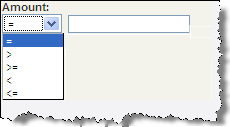
    arrowpointemaps_mapform_number.png

  • Map Page Filter Fields now support Text, Email & URL fields. These fields are rendered with a drop-down to select a comparison operator (equals, contains, starts with, etc.) and then a text box to input a value. An example is below:
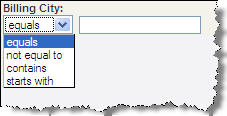
    arrowpointemaps_mapform_text.png

  • Increased the number of Map Form Filter Fields from 7 to 12.
  • Removed the following Special Map Form Fields since the new Text field support fulfills these requirements and makes the comparison operator more dynamic.
    • City Contains
    • State Province Equals
    • Postal Code Starts With
    • Country Equals
  • If you were using any of the deprecated fields from the above bullet, I performed data updates on your Map Pages and added the equivalent Map Form Filter Field, so you don’t lose any functionality. The end result is that your Map Pages contain the same query fields as they did before I made any changes.

NOTE: If you are using Arrowpointe Maps and are confused by these posts about new versions, just know that these updates are happening automatically for you. You do not need to re-download the AppExchange application. Changes to the AppExchange package will be few and far between and those will be communicated very explicitly.

About Arrowpointe Maps

Arrowpointe Maps is an on-demand mapping platform that facilitates a conversation between Salesforce.com & MapQuest allowing for easy deployment of mapping capabilities in your organization and providing end-users a simple means for mapping their data. Arrowpointe Maps is configurable and can be tailored to your organization, so that your users can work with their information in a meaningful way.

The official location for information on Arrowpointe Maps is its product page at http://www.arrowpointe.com/maps. There, you will find answers to the most frequently asked questions and have the ability to submit your contact information for an invitation to try it.

Comments off comments feed

Arrowpointe Maps v1.0.2

An update was made to Arrowpointe Maps tonight. Most notable of the changes (see Change History for all changes) is the ability to add a Record Type filter on Map Pages.

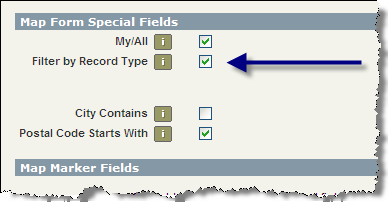
To do so, edit your Map Page and check the box that says Filter by Record Type (as depicted below) and save your Map Page. The next time you run the Map Page, Arrowpointe Maps will present a filter field listing all the active Record Types for the primary object.

arrowpointemaps_recordtypefilter.png

About Arrowpointe Maps

Arrowpointe Maps is an on-demand mapping platform that facilitates a conversation between Salesforce.com & MapQuest allowing for easy deployment of mapping capabilities in your organization and providing end-users a simple means for mapping their data. Arrowpointe Maps is configurable and can be tailored to your organization, so that your users can work with their information in a meaningful way.

The official location for information on Arrowpointe Maps is its product page at http://www.arrowpointe.com/maps. There, you will find answers to the most frequently asked questions and have the ability to submit your contact information for an invitation to try it.

Comments off comments feed

Salesforce.com AIR Application Sample

Dave Johnson posted an overview of an AIR Application that connects to Salesforce.com that he created. It’s HTML/Ajax application running on Abode AIR.

Comments off comments feed

Next entries » · « Previous entries