Archive for APEX Code Category Feed

Using Aggregate Functions

In Spring ’10 Salesforce released new Apex functionality for aggregate functions.  Prior to this feature being available, one would have to perform a large query, loop through it and perform calculations themselves to do things like count records, sum values, get the max value, etc.  Now, you can do it in one simple, fast query!

The API Guide has all the details about how to perform aggregate functions in SOQL, but at a high-level, they (along with the GROUP BY clause) let you do things like:

  • Get a count of Accounts grouped by Industry & State
  • Get the avg Opportunity amount grouped by Calendar Month
  • Get the sum of Custom Object $ field grouped by Account
  • etc.

Get the idea?  The functions you have available are COUNT(), COUNT_DISTINCT(), AVG(), SUM(), MIN(), MAX(). Think of these like you would the Columns To Total in a summary report.

You can also use the GROUP BY clause in your query to summarize your data by other fields.  Think of it like a Summary Report grouping.

The best way to learn it is to put it into practice.  To do so, I am going to “upgrade” the code from my Campaign Member Summary using Google Charts post.  The goal is to create a chart that looks like below:
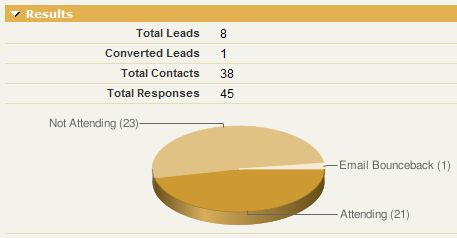
The original controller used the following code to build the count of records per Campaign Member Status:

// List of valid Campaign Member Statuses for the Campaign
List<CampaignMemberStatus> list_cms = [select Id, Label from CampaignMemberStatus where CampaignId = :camp.id];

// Loop through each Campaign Member Status, get a count of Campaign Members and add it to the items list
for (CampaignMemberStatus cms:list_cms) {
integer Count = [select count() from CampaignMember where CampaignId = :camp.id AND Status = :cms.Label];
if (Count > 0) {
items.add(new ChartDataItem(cms.Label, Count.format()));
}
}

The code above works just fine, but has some issues. The main issue is that we are performing a query inside a for() loop. Bad! If a Campaign had more than 20 statuses, the code would fail. Also, this is a performance hit because we have to perform as many queries as there are member statuses. Enter aggregate functions.

The improved controller changes the query to work like this.

// Get all the data in one query
AggregateResult[] groupedResults = [select Status, count(Id) from CampaignMember where CampaignId = :camp.id group by status];

// Loop through the query and add chart items
for (AggregateResult ar : groupedResults) {
     items.add(new ChartDataItem( String.valueOf(ar.get('Status')), String.valueOf(ar.get('expr0'))));
}

Now we are doing everything we need in 1 query. Even if we had 1000 different member statuses, it wouldn’t matter. We should never hit a governor limit with this code and performance has also been improved. Some important things to note in making this change and in understanding aggregate functions:

  • Your controller class should be on API version 18.0 or higher. 18.0 is the Spring ’10 release and that’s when these functions were introduced.
  • The results of a query with aggregate functions should result in a AggregateResult[] collection.
  • The get() method is used to retrieve data from an AggregateResult object (used inside the loop when looking at a single result)
  • To get the value from a field your are grouping by (i.e. doesn’t have a function for it), use .get(‘fieldName’). In the above example, I use this to get the Status value I am grouping by.
  • To get the value from a field that has an aggregate function, use .get(‘expr#’), where # is the index number for that field. A query can have multiple functions in it so you need to specify which function you are grabbing and you do so by its index number. For you non-programmers out there, remember that counting starts at 0. In the above example, I use this to get the count(id) value. Since I only have 1 aggregate function in my query, i get it using .get(‘expr0′) where 0 is the index number for my function result.
  • The get() method returns an Object type so you will need to use the appropriate valueOf() method to put it into the data type you need.

NOTE: As of writing this post, the IDE was not yet upgraded to 18.0 so I had to do this work inside the browser and I used the new-ish Deploy functionality from inside Salesforce to migrate the change from Sandbox to Production.

Comments (19) comments feed

Associate Email to Salesforce Task to Opportunity

I use the Email to Salesforce functionality every single day.  This feature allows you to get a random email address similar to emailtosalesforce@0235ffdsdfsad98dvfj4i549540njh3.in.salesforce.com (this is just a sample) that you bcc on emails and Tasks get created in your system that are auto-associated to your Leads/Contacts.

There is an option to associate the Task to Opportunities, but instead of creating a Task and associating it to the Lead/Contact AND the Opportunity, 2 tasks are created: one against the Lead/Contact and another against the Opportunity.  I have no idea why it was designed this way, but it was.  Given that, I don’t use the option to associate the Task to Opportunities.

After months of manually assigning to Opportunities after I send the email, I got fed up and wrote a trigger that senses an email to salesforce record and auto associates it to the nearest Open Opportunity.  I thought I’d share it with y’all.

This code assumes the following:

  • You are using Email to Salesforce
  • You have the Email to Salesforce option for Leads & Contacts enabled and the one for Opportunities disabled
  • You associate Contacts to your Opportunities via the OpportunityContactRole object

Trigger

trigger Tasks on Task (before insert) {

	// BEFORE INSERT
	if(Trigger.isBefore && Trigger.isInsert){
		Tasks t = new Tasks();
        t.AssociateOpportunity(Trigger.new);
    }

}

Class

public class Tasks {

    // Default Constructor
    public Tasks()
    {
    }

    // Associates a new Task generated by Email to Salesforce to an open opportunity, if one exists for the Account
    public void AssociateOpportunity(Task[] tasks)
    {

    	/***************
        * Variables
        ***************/
		list<Task> l_Tasks = new list<Task>(); // Tasks we'll be updating
		set<ID> s_ContactIDs = new set<ID>(); // Set of Contact IDs

		/***************
        * Initial Loop
        ***************/
		for(Task t:tasks) {

			// Add Task to working list and collect the Contact ID
			if (t.WhatId == null && t.Subject.startsWith('Email:') && t.WhoId != null) {
				// only for Contacts
				if (String.valueOf(t.WhoId).startsWith('003')){
					l_Tasks.add(t);
					s_ContactIDs.add(t.WhoId);
				}
			}

		}

		/***************
        * Create Maps
        ***************/
        // Maps Contact ID to an Opportunity ID
		map<ID, ID> map_cID_to_oID = new map<ID, ID>();
			// Query for the Contact's Open Opportunities. Sort by CloseDate DESC so the Task gets assigned to the earliest Opportunity as it loops
			for (OpportunityContactRole ocr:[select Id, OpportunityId, ContactId
											 from OpportunityContactRole
											 where ContactId in :s_ContactIDs
											 AND Opportunity.IsClosed = false
											 order by Opportunity.CloseDate DESC
											 ]) {
				map_cID_to_oID.put(ocr.ContactId, ocr.OpportunityId);
			}

		/***************
        * Process Records
        ***************/
		for (Task t:l_Tasks) {

			// If the Contact has an Opportunity mapped to it, update the Task with that Opportunity
			if (map_cID_to_oID.get(t.WhoId) != null) {
				t.WhatId = map_cID_to_oID.get(t.WhoId);
			}

		}
    }

}

Test Class

@isTest
private class Tasks_Test {

    static testMethod void AssociateOpportunity_Test() {

        // Create a Lead
        Lead l = new Lead();
	        l.FirstName = 'Test';
	        l.LastName = 'Lead';
	        l.Company = 'Test Company';
	        l.Email = 'leademail@example.com';
        insert l;

        // Create an Account
        Account a = new Account();
        	a.Name = 'Test Account';
        insert a;

        // Create a Contact
        Contact c = new Contact();
	        c.FirstName = 'Test';
	        c.LastName = 'Contact';
	        c.AccountId = a.Id;
	        c.Email = 'contactemail@example.com';
        insert c;

        // Create Opportunities
        list<Opportunity> l_Opps = new list<Opportunity>();
        Opportunity o = new Opportunity();
        	o.AccountId = a.id;
        	o.Name = 'Test Opportunity';
        	o.CloseDate = date.today();
        	o.StageName = 'Qualified';
        	o.Description = 'Test Opportunity Description';
        l_Opps.add(o);

        Opportunity o2 = new Opportunity();
        	o2.AccountId = a.id;
        	o2.Name = 'Test Opportunity';
        	o2.CloseDate = date.today().addDays(30);
        	o2.StageName = 'Qualified';
        	o2.Description = 'Test Opportunity Description';
        l_Opps.add(o2);

        Opportunity o3 = new Opportunity();
        	o3.AccountId = a.id;
        	o3.Name = 'Test Opportunity';
        	o3.CloseDate = date.today().addDays(60);
        	o3.StageName = 'Closed Won';
        	o3.Description = 'Test Opportunity Description';
        l_Opps.add(o3);

        insert l_Opps;

        // Create Opportunity Contact Roles
        list<OpportunityContactRole> l_Ocr = new list<OpportunityContactRole>();
    	OpportunityContactRole ocr1 = new OpportunityContactRole();
    		ocr1.ContactId = c.id;
    		ocr1.OpportunityId = o.id;
			ocr1.IsPrimary = true;
			ocr1.Role = 'Decision Maker';
		l_Ocr.add(ocr1);

		OpportunityContactRole ocr2 = new OpportunityContactRole();
    		ocr2.ContactId = c.id;
    		ocr2.OpportunityId = o2.id;
			ocr2.IsPrimary = true;
			ocr2.Role = 'Decision Maker';
		l_Ocr.add(ocr2);

		insert l_Ocr;

        /* Create Tasks for Test Cases */
        list<Task> l_Tasks = new list<Task>();

        // Task associated to Lead, not Contact
        Task t1 = new Task();
        	t1.Subject = 'Email: something';
        	t1.Status = 'Completed';
        	t1.WhoId = l.id;
        	t1.ActivityDate = Date.today();
    	l_Tasks.add(t1);

    	// Task with wrong subject
    	Task t2 = new Task();
        	t2.Subject = 'something';
        	t2.Status = 'Completed';
        	t2.WhoId = c.id;
        	t2.ActivityDate = Date.today();
    	l_Tasks.add(t2);

    	// Task with no WhoId
    	Task t3 = new Task();
        	t3.Subject = 'something';
        	t3.Status = 'Completed';
        	t3.ActivityDate = Date.today();
    	l_Tasks.add(t3);

    	// Task with a What ID already
    	Task t4 = new Task();
        	t4.Subject = 'something';
        	t4.Status = 'Completed';
        	t4.WhoId = c.id;
        	t4.WhatId = o2.id;
        	t4.ActivityDate = Date.today();
    	l_Tasks.add(t4);

    	// Task that should get triggered fully
    	Task t5 = new Task();
        	t5.Subject = 'Email: something';
        	t5.Status = 'Completed';
        	t5.WhoId = c.id;
        	t5.ActivityDate = Date.today();
    	l_Tasks.add(t5);

    	insert l_Tasks;

 		/* Asserts */

 		// Task 1 should not have a What ID populated
 		Task t = [select Id, WhoId, WhatId from Task where Id = :t1.id limit 1];
 		system.assertEquals(t.WhatId, null);

 		// Task 2 should not have a What ID populated
 		t = [select Id, WhoId, WhatId from Task where Id = :t2.id limit 1];
 		system.assertEquals(t.WhatId, null);

 		// Task 3 should not have a What ID populated
 		t = [select Id, WhoId, WhatId from Task where Id = :t3.id limit 1];
 		system.assertEquals(t.WhatId, null);

 		// Task 4 should have the same What ID it had originally populated
 		t = [select Id, WhoId, WhatId from Task where Id = :t4.id limit 1];
 		system.assertEquals(t.WhatId, o2.id);

 		// Task 5 is the one that should've had the Opportunity ID auto populated
 		t = [select Id, WhoId, WhatId from Task where Id = :t5.id limit 1];
 		system.assertEquals(t.WhatId, o.id);

    }
}

Let me know if you have any suggestions.

Comments (3) comments feed

Invoking Apex from a Button (JS –> Apex Web Service)

In January I posted about how to invoke Apex from a Custom Button using a Visualforce Page.  It has been a popular post and is a topic which is of interest to many developers.  I wanted to draw your attention to another post.  Sam Arjmandi, from Salesforce Source, posted about how to invoke Apex from a button by calling the Apex directly from JavaScript whereby the Apex must be available as a web service.

Both methods work just fine and there is a choice of approach.  Recently, my personal choice for implementing this kind of functionality is to use Sam’s approach and it’s mostly due to the user experience.  Using this approach, the code is called directly and there is no time spent by the browser needing to load a new blank page only to return to the same page.  It works much more seamlessly.  You also get the benefit of having less objects to develop (no VF page) and tie together.  The only real downside (outside of requirement-specific ones) is that Salesforce won’t bark at you if you delete the web service class because it doesn’t know that the web service is tied to JavaScript.  If your Apex Code is a controller for your VF page, Salesforce will protect you from deleting it accidentally.

Comments (2) comments feed

Force.com Debug Log Parser

Kyle Peterson has released the Force.com Debug Log Parser, a nifty little .NET app for parsing the mess of a debug log you get from Salesforce when executing Apex code.   You can see a video demonstration here.

Great work, Kyle!

P.S. The comments to the post suggest an interest by Salesforce to include this into the IDE.  Hopefully that happens.  Until then, I’ll install this version and use it regularly.

Comments (1) comments feed

Testing HTTP Callouts

When writing Apex Code, there are some things that simply cannot be tested, namely HTTP callouts.  The Intro to Apex Code Test Methods has one solution to testing as much of an HTTP callout as possible.  That is to break the HTTP callout into 3 methods: 1) Build Request, 2) Make Request, 3) Handle Response.  In the test method, you are only calling the Build Request and Handle Response methods.

I have another approach.  My main reason for not using the approach mentioned above is that I didn’t read that post until after I developed something.  However, my approach accomplishes the same thing, but also adds a variable to your class so that you can know whether or not a test is running.  Knowing this may be useful in other situations too.

Here’s is a class that uses my technique.

public class sample {

	// Static variable that assumes a test is not running
	public static boolean isApexTest = false;

	public String main(){

	    // Do a whole bunch of stuff

		// Build the http request
		Http h = new Http();
		HttpRequest req = new HttpRequest();
	    req.setEndpoint('http://local.yahooapis.com/MapsService/V1/geocode?appid=YD-9G7bey8_JXxQP6rxl.fBFGgCdNjoDMACQA--&street=701+First+Ave&city=Sunnyvale&state=CA');
	    req.setMethod('GET');

		// Invoke web service call
		String result = '';
		if (!isApexTest){
			// Make a real callout since we are not running a test
			HttpResponse res = h.send(req);
			result = res.getBody();
		} else {
			// A test is running
			result = '<?xml version="1.0"?><ResultSet xmlns:xsi="http://www.w3.org/2001/XMLSchema-instance" xmlns="urn:yahoo:maps" xsi:schemaLocation="urn:yahoo:maps http://api.local.yahoo.com/MapsService/V1/GeocodeResponse.xsd"><Result precision="address"><Latitude>37.416397</Latitude><Longitude>-122.025055</Longitude><Address>701 1st Ave</Address><City>Sunnyvale</City><State>CA</State><Zip>94089-1019</Zip><Country>US</Country></Result></ResultSet>';
		}

		// Do whole bunch of stuff

	    return result;
	}

	// Wrapper method for "main" that we will call in the Test Class
	public String mainForTest(){
		isApexTest = true;
		return main();
	}
}

I have a static variable called isApexTest that I set to false by default so the code assumes a test is not running.  For testing purposes, I created a “wrapper” method (called “mainForTest()”) that I will call in my test class in order to test the main() method. This wrapper method sets the isApexTest variable to true, calls the main() method and then passes back the result from the main() method. mainForTest() is merely a way to get the isApexTest variable set to true.

My test class is below.

@isTest
private class sample_test {

    static testMethod void main_test() {

		// Establish sample class
		sample s = new sample();

		// Call the mainForTest wrapper method so we can set the variable indicating that a test is running
		String retVal = s.mainForTest();

	 	// Add asserts for validation
	 	String expectedResult = '<?xml version="1.0"?><ResultSet xmlns:xsi="http://www.w3.org/2001/XMLSchema-instance" xmlns="urn:yahoo:maps" xsi:schemaLocation="urn:yahoo:maps http://api.local.yahoo.com/MapsService/V1/GeocodeResponse.xsd"><Result precision="address"><Latitude>37.416397</Latitude><Longitude>-122.025055</Longitude><Address>701 1st Ave</Address><City>Sunnyvale</City><State>CA</State><Zip>94089-1019</Zip><Country>US</Country></Result></ResultSet>';
	 	System.assertEquals(retVal, expectedResult);

	 }

}

In case you are wondering why I use a static variable for isApexTest instead of a class property, it is because I originally developed this technique to test an Apex Web Service. Since all web service methods are static, I couldn’t create an instance of a class to set the property to true and then call the web service method. Web service methods must be invoked directly and not through an instance of a class. That’s where the wrapper method idea came from.

Another approach than a wrapper method would be to have an input variable to my main() method that accepts true/false whether a test was running.  I did not go with this approach because I might have many methods performing callouts and I preferred to have 1 public variable accessible throughout the entire class than a local variable in each method. If I used a local variable, I would need to keep passing it around to other methods.

Comment with your thoughts and alternative approaches.

Comments (12) comments feed

Next entries » · « Previous entries