Draggin’ Role 1.0

Publisher: DrivEnable
Product: Draggin’ Role 1.0
Company Homepage
AppExchange Page
3star.png

Michaelforce is a Salesforce administrator who has decided to create & share a new, free AppExchange application for administrators to use when managing roles. He is releasing it through DrivEnable.com. Per the listing:

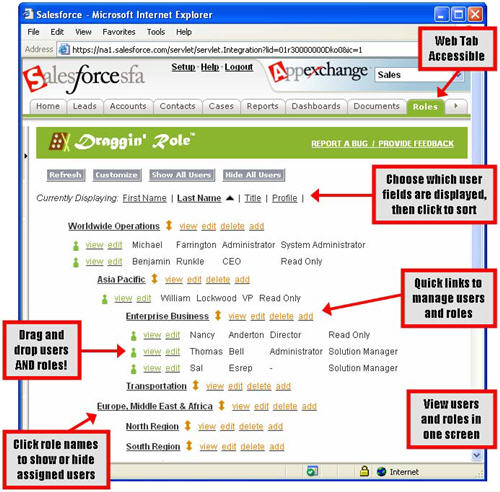
Manage your role hierarchy with ease! Now you can drag and drop your way through any hierarchy modifications. Draggin’ Role is a free application that allows you to view and manipulate users AND roles from a single Custom Tab.

It is a handy utility to work with the role hierarchy, get the reporting relationships correct and associate users to it.

Draggin_Role.jpg

It uses the AJAX toolkit to do its work. You can see all the code he used to write it in your s-Controls and it could serve as a good AJAX toolkit example for you.

It’s worth a look. If nothing else, it should be a clear indicator that Salesforce needs to revamp the user experience in the Setup area. Especially when working in more complex/tedious areas to administer such as the Role Hierarchy, Forecast Hierarchy, Territory Management, Profiles, etc. It takes a lot of clicking to get anything done today.

An alternative to Draggin’ Role is OrgView by Dreamfactory.

Comments off comments feed

Highrise, from 37 Signals, is coming

The folks at 37 Signals have finally made their first official announcement regarding their new CRM application they have been building. They call it “Highrise” (previously known as Sunrise).

Over the next several weeks, they should be posting videos and other marketing materials about it. The depth of functionality in it remains to be seen. Based upon the description on their post, it sounds like it will be a basic Contact manager, as opposed to a complete CRM application. This is probably not much of a threat to Salesforce as a whole, but will likely be a viable option for single users and small teams that want to manage their contacts and manage activities related to them.

37 Signals has a tendency to release applications that people love to use (Basecamp for Project Management, Backpack for getting yourself organized, Backpack Calendar for calendaring, Campfire for chat), and they are leaders in the use of AJAX to enhance the user experience. Highrise will be an interesting application to check out. If nothing else, it should provide some user experience ideas to apply to Salesforce. Keep an eye on it.

You can sign up for their Highrise mailing list at http://www.highrisehq.com/.

Comments off comments feed

CRM Roundup on IT|Redux

The ITRedux blog feed-icon-12x12.png has a nice post comparing 9 on-demand CRM applications. It’s a good article to read to get a sense of what else is out there as an on-demand CRM tool. The CRM applications they review are:

IT|Redux is the leading blog when it comes to “Office 2.0”. The author of the blog, Ismael Ghalimi, is the one that put together the Office 2.0 conference, which took place in San Francisco last October immediately following Dreamforce. He maintains a database of Office 2.0 applications. One of their many categories is CRM applications.

A few other on-demand CRM applications that I have on my list that are not covered on that post are:

Also, 37 Signals is supposed to be coming out with a CRM solution some day. They posted about it over a year ago, but nothing has come to fruition yet.

Comments (1) comments feed

Stopping Web to Lead Spam

Check out a more recent post about stopping web to lead spam. I was able to integrate Akismet into the process and have scripts available to download.

Over the past week, I have had an ever-increasing number of web-to-lead spam entries come into my Org. It gets to be VERY frustrating! Unfortunately, Salesforce.com does not have any sort of anti-spam functionality for web-to-lead (want them to? Vote for it).

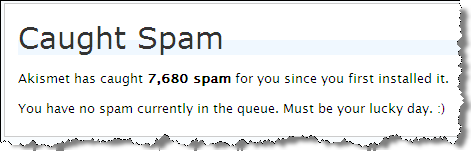
What would be great is an add-in to Salesforce.com that evaluates a Lead’s content prior to getting in the Org. Blog software has this for comments. For example, I use Akismet on this blog to take care of the non-stop comment spam I get. It is incredible. It catches 99% of it. If Akismet didn’t exist, I probably would stop allowing comments on this blog.
akismet_spam_caught.png

If you use a tool like Form Assembly or Clicktools for web-to-lead forms, they have functionality to help you. However, what if you don’t?

I discovered that Validation Rules work pretty well. If you can determine any consistencies with the spam you are getting, create a Lead Validation Rule to stop it. For example:

AND(
ISPICKVAL(LeadSource , "Web"),
OR(
CONTAINS( Description , "mortgage") ,
CONTAINS( Description , "diploma") ,
CONTAINS( Description , "auto loan")
))

The Validation rule above will cause an error for any lead with a Lead Source of “Web” AND the Description contains any of the following: “mortgage”, diploma”, “auto loan”. You can make the message of the validation rule say “This is Spam”.

Web to Lead records do not get created if they don’t pass the Validation Rule. However, you will get an email from Salesforce Support with a subject of “Salesforce Lead Alert” with the Lead information in it. What I did was to create an email rule that label emails meeting the following criteria (another alternative would be to delete them):

  • From Salesforce Support
  • Subject of “Salesforce Lead Alert”
  • With “This is Spam” in the message body

If you go this route, be careful not to make your Validation Rule too generic. You could end up stopping a good lead from coming in. If you do happen to neutralize a good Lead, the lead’s information will be in the “Salesforce Lead Alert” email you received. It’d be a good idea to review those emails from time to time.

This is not a long term solution, but can help alleviate some pain.

An alternative approach would be to do something similar with Workflow Field Update Rules or Lead Assignment Rules and to auto-set the Lead Status to “Spam” or to assign it to a “Spam” queue. Doing this will capture the Lead in the database, but will help segment it out of your way.

Comments (10) comments feed

Auto-Complete Lookups

Publisher: Salesforce Labs
Product: Auto-Complete Lookups
AppExchange Page
4star.png

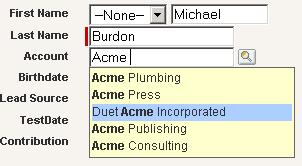
Salesforce Labs has another cool application out on AppExchange. This is a great add-on for usability. It is called Auto-Complete Lookups and it affects Account, Contact and User lookups right now, but more are planned.

Once you install it, you need to visit it’s web tab to get started. From that web tab you will be instructed on how to set it up. In short, what you do is:

  • Generate JavaScript on the Web Tab. Copy it to your clip board
  • Paste the JavaScript into the Messages & Alerts section of the homepage. If you have other text in there for your users, just paste the code at the bottom.
  • On the Setup | Customize | User Interface screen, set the “Show Custom Sidebar Components on All Pages” to true.
  • Start using it
  • After you have completed your third letter, the lookup starts.

    AutoComplete.jpg

    It uses the AJAX toolkit to perform the lookup. In my org, the performance was pretty good. I have no idea how it will perform with a large dataset.

    This is a great add-on that is very easy to implement and could be of great value to end users. I recommend it. It will get 5 stars as soon as it supports all objects.

Comments (4) comments feed

Next entries » · « Previous entries