Screencast: Arrowpointe Maps (End-User Perspective)

I have put together a quick screencast of Arrowpointe Maps so you can get a sense of how it functions from the perspective on an end-user. Click the image below to launch the screencast. Once launched, you might want to put your browser in Full Screen mode.

APMaps_EndUserDemo.png

About Arrowpointe Maps

Arrowpointe Maps is an on-demand mapping platform that facilitates a conversation between Salesforce.com & MapQuest allowing for easy deployment of mapping capabilities in your organization and providing end-users a simple means for mapping their data. Arrowpointe Maps is configurable and can be tailored to your organization, so that your users can work with their information in a meaningful way.

The official location for information on Arrowpointe Maps is its product page at http://www.arrowpointe.com/maps. There, you will find answers to the most frequently asked questions and have the ability to submit your contact information for an invitation to try it.

You can also learn about Arrowpointe Maps by reading the product announcement on this blog.

Comments off comments feed

Summer ’07 Features for Developers

Just echoing Simon Fell’s recent post. There is a post on the ADN Wiki about Summer ’07 Features for Developers.

As mentioned on July 5, Salesforce has a Summer ’07 landing page that provides detail for the developer features and more.

Comments off comments feed

Salesforce Integration 101

The ADN site has a new series on integration (ref).

Part 1 is a screencast overview of your integration options (ADN login is required to view it). If you are getting started with Salesforce integration or maintaining a curriculum for people in your company, this is a good place to point them to. Part 1 should help you visualize the various options and segment them in your mind, so you can figure out the integration method that works best to address your needs.

Part 2 is called “Next Generation Integration Services”, which will talk about new capabilities in store for the platform. No date is published for it. Just that it’s “coming soon”.

Visit the Enterprise Integration Series on ADN.

Comments off comments feed

Arrowpointe Maps supports Custom Objects

The #1 enhancement request for Arrowpointe Maps is support for custom objects. Arrowpointe Maps build version 1.0.1 was just released and delivers on this request.

Version 1.0.1 includes custom object support as well as some performance enhancements that should improve the user experience (change history).

To implement support for your custom objects, do the following:

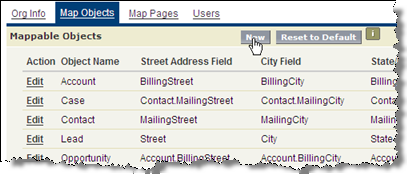
  1. Navigate to the Map Objects page in the Arrowpointe Maps administration area and press the New button.
    arrowpointemaps_newmapobject1.png

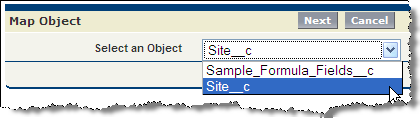
  2. Select the Custom Object you want to setup and click Next.
    arrowpointemaps_newmapobject2.png

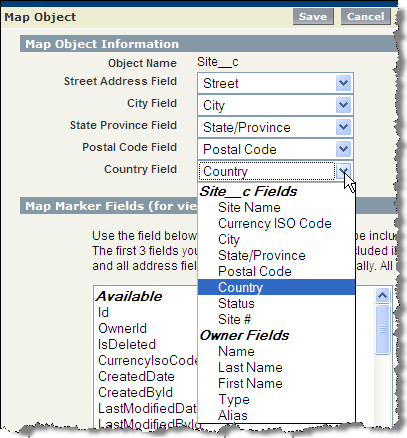
  3. Tell Arrowpointe Maps where your address data resides on that object. Select the field containing each address component and then click Save. Version 1.0.1 supports stand-alone custom objects, meaning that the address data must reside on the custom object itself and not a related object.
    arrowpointemaps_newmapobject3.png

After completing those 3 steps, your object is ready. Your next step is to create your Map Page so your users can map the data that resides in this custom object. The Map Page will define how the users can query for data in this object and also what data will be included in the map. Creating a Map Page for a Custom Object is identical to doing so for one of the standard objects Arrowpointe Maps supports (Leads, Accounts, Contacts, Opportunities and Cases), so I will not go into it here. The Getting Started Guide for Admins on the Support Site has information on how to create a Map Page.

That’s it. From start to finish, you can have your custom object ready for mapping (including testing) in less than 10 minutes.

About Arrowpointe Maps

Arrowpointe Maps is an on-demand mapping platform that facilitates a conversation between Salesforce.com & MapQuest allowing for easy deployment of mapping capabilities in your organization and providing end-users a simple means for mapping their data. Arrowpointe Maps is configurable and can be tailored to your organization, so that your users can work with their information in a meaningful way.

The official location for information on Arrowpointe Maps is its product page at http://www.arrowpointe.com/maps. There, you will find answers to the most frequently asked questions and have the ability to submit your contact information for an invitation to try it.

You can also learn about Arrowpointe Maps by reading the product announcement on this blog. If you are interested in subscribing to the contents of the blog, you can get more information here.
Comments off comments feed

YubNub Command to Search the AppExchange

Lifehacker (one of my favorite blogs) has a post today about YubNub. If you don’t know what YubNub is, they bill themselves as

A (social) command line for the web

Basically, it lets you use their site as a way to run commands on other sites. To use it, you start with the command and then follow it with the context. For example, you could type “g arrowpointe” to search Google for “Arrowpointe”, “weather 60601” to get the weather in Chicago. There are literally 1000s of options and it’s not all about searching. It is a way to avoid going to every individual site to do things. It’s pretty interesting once you start messing around with it. I can’t say I’ll be using it every day, but I could see how one could master it and get quite a bit more productive. I added the Firefox Search Plugin for it to start using it and see what I think.

A cool feature to it is that anyone can create new commands. To do so, you go here, give it a name and then put in the URL the command should use with placeholders to drop in the context of your command. To try it out, I created the command apex that searches the AppExchange.

To use it, go to YubNub (or use your Firefox YubNub search engine) and type “apex WhatToSearchFor” (e.g. “apex arrowpointe” will search the AppExchange for Arrowpointe’s applications). I will be using this one. It’s one less step to going to the AppExchange site first and then searching.

Comments (1) comments feed

Next entries » · « Previous entries